Your coding agent has a fixed amount of working memory, and most setups burn a big slice of it before the first prompt is typed. The fix is one rule: don't pay for what you don't use.
This post is based on Daisy Hollman's talk, How Anthropic uses Claude Code: Agentic Software Engineering at Scale. It extends the talk with worked examples for prompt caching and agent memory.
TL;DR
- Everything loaded up front is paid for on every turn, so load only what you need.
- Use hooks for feedback, skills for knowledge, sub-agents for heavy lifting and Tool Search for MCP schemas.
- Never rewrite the start of the prompt mid-session. Append context instead, so the cache keeps working.
- Keep rules you write apart from notes the agent writes.
The window is a budget
The context window is the one constraint that hasn't moved. Models got better and tasks got longer, but the ceiling is up to 1 million tokens, depending on the model.
Everything you load up front competes with the actual work: system prompts, tool definitions, instruction files and files the agent has read. A bigger window doesn't fix this. Anthropic's docs note that accuracy and recall degrade as token count grows, so curating what's in context matters as much as how much space is left.
┌────────────────────────────────────────────────────────────────────────┐
│                      FIXED CONTEXT WINDOW (~1M TOKENS)                 │
├───────────────────┬────────────────────────────────────────────────────┤
│ Upfront overhead  │             Task execution workspace               │
│ (system prompt,   │      (file reads, code edits, tool outputs,        │
│ tool schemas,     │             reasoning and planning)                │
│ unconditional     │                                                    │
│ rules)            │                                                    │
└───────────────────┴────────────────────────────────────────────────────┘
Think of it as running npm on an Arduino. On a desktop you can pull in a dozen dependencies and never notice. Here every token has a real cost in memory and money, so you can't dump a codebase or a docs site into the prompt and hope for the best.
There's a second catch: the prompt cache. On most models, cache reads cost 0.1x the base input price, which is the "up to 10x cheaper" in practice. You only get that price while the start of the prompt stays identical between turns. Anything that swaps rules in and out turn by turn, like an LRU cache for instructions, breaks the prefix and sends your bill up.
One principle: zero overhead
Anything that is always loaded is always paid for. A big CLAUDE.md bundled with a plugin costs tokens on every turn, whether or not the turn has anything to do with it. Install a few of those and you've spent the budget before you started.
So aim for tools that cost nothing while idle and only enter the context when something actually triggers them.
Four tools, four price tags
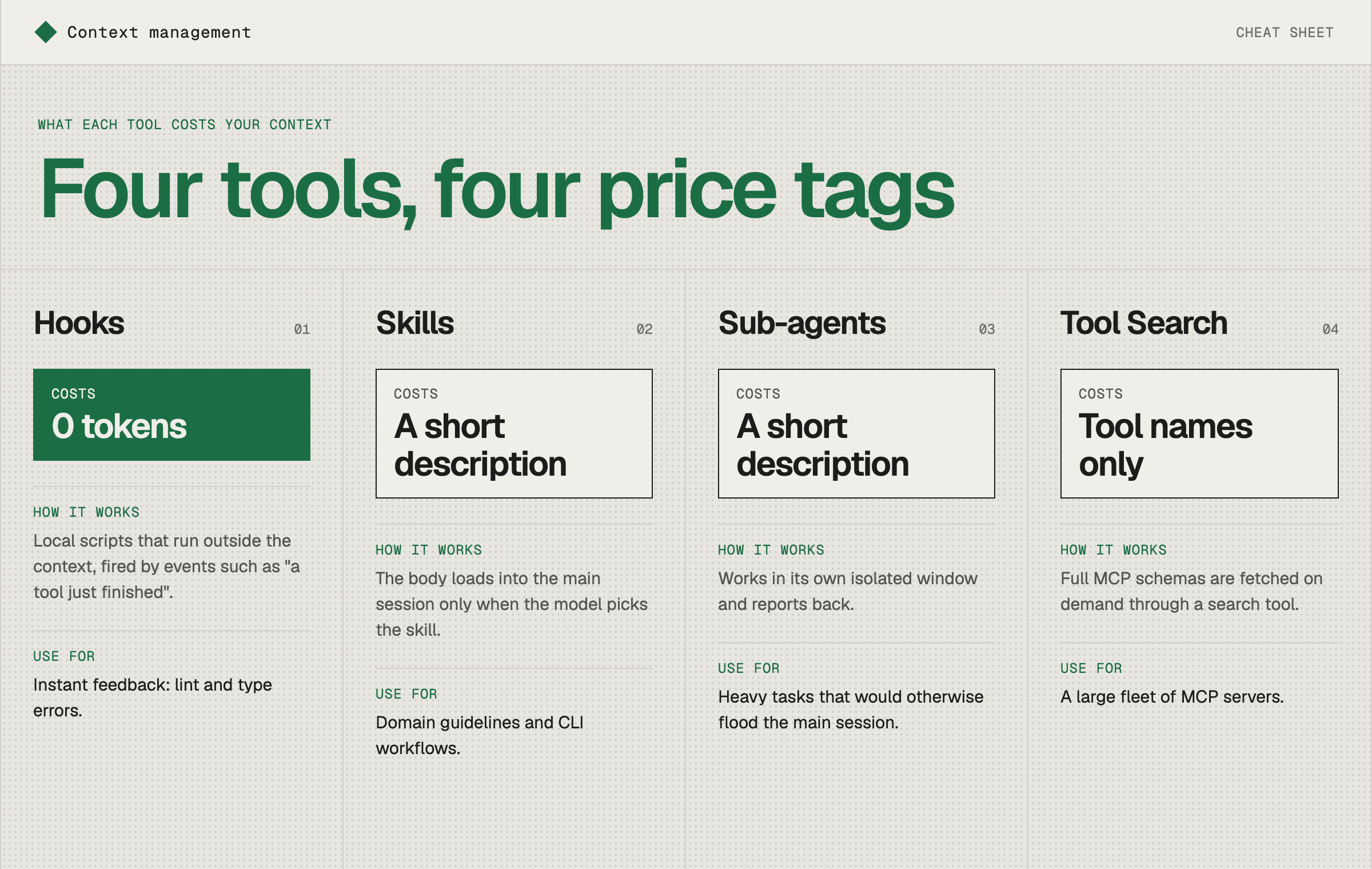
- Hooks cost 0 tokens. They are local scripts that run outside the context, fired by events such as "a tool just finished". Use them for instant feedback: lint and type errors.
- Skills cost a short description. The body loads into the main session only when the model picks the skill. Use them for domain guidelines and CLI workflows.
- Sub-agents cost a short description. They work in their own isolated window and report back. Use them for heavy tasks that would otherwise flood the main session.
- Tool Search (MCP) costs tool names only. Full schemas are fetched on demand through a search tool. Use it when you have a large fleet of MCP servers.
Hooks: red squigglies for agents
An editor underlines your mistake the moment you make it. A hook can do the same for an agent.
The hook runs after each edit, decides in a few cheap CPU cycles whether the edit matters, and only talks to the model when something is wrong. The rest of the time it costs nothing, and the agent never wastes tokens discovering the error at compile time ten steps later.
#!/bin/bash
# post-tool-use-hook.sh (runs after each edit)
INPUT=$(cat)
FILE=$(echo "$INPUT" | jq -r '.tool_input.file_path // empty')

# Not a TypeScript file? Exit silently. Zero context spent.
[[ "$FILE" == *.ts ]] || exit 0

# Type-check, and speak up only if something is broken.
if ! OUTPUT=$(npx tsc --noEmit 2>&1); then
  echo "Type errors after editing $FILE:" >&2
  echo "$OUTPUT" >&2
  exit 2   # exit code 2 sends stderr back to the model
fi
Skills: lazy system prompts
A skill is a folder with a SKILL.md. Only the short front matter lives in the system prompt at startup. The detailed body is expanded when the model decides it needs it.
---
name: database-migrations
description: "Instructions for creating and running PostgreSQL schema migrations using Prisma. Use when updating database models."
---

# Database Migration Guidelines
1. Always run `npx prisma migrate dev --name <migration_name>` in dry-run mode first.
2. Ensure backward compatibility for existing production tables.
3. Check foreign key constraint definitions in `prisma/schema.prisma`.
The catch: in a huge monorepo with thousands of skills, even the descriptions add up. Keep each one short and specific.
Tool Search: don't load every MCP schema
Connect a few dozen MCP servers and their JSON schemas can swallow the baseline prompt. Turn on Tool Search instead. Only tool names sit in the prompt, and the agent pulls the full schema through a search tool when it needs one.
Keep the prompt prefix static
The same cost logic applies to your own project rules. Picture a React and TypeScript monorepo with separate rules for testing, API conventions, styling and migrations. You want the right rule loaded at the right time. Two approaches get you there, and one of them wrecks the cache.
Bad: swap rules in and out per turn
A hook or wrapper script rewrites the system prompt (or CLAUDE.md) based on what you're doing:
Turn 1: "Write a test for useAuth"
┌─────────────────────────────────────────┐
│ system prompt                           │
│ ## Active rules                         │
│ - testing.md (full 800 tokens)          │  ← injected
└─────────────────────────────────────────┘
│ user: Write a test for useAuth          │
│ assistant: ...                          │

Turn 2: "Now add an endpoint for it"
┌─────────────────────────────────────────┐
│ system prompt                           │
│ ## Active rules                         │
│ - api-conventions.md (full 1200 tokens) │  ← testing evicted, API swapped in
└─────────────────────────────────────────┘
│ user: Write a test for useAuth          │  ← identical to before, but cache is dead
│ assistant: ...                          │
│ user: Now add an endpoint for it        │
The change happens near the top, so everything after it, the entire conversation, is a cache miss. Anthropic's docs describe why: the cache follows the order tools, then system, then messages, and a change at one level invalidates that level and every level after it. Every turn you pay full price to reprocess the whole history. The model also loses the testing rules it was just following, so it may drift on the earlier test.
Good: a static index, expanded by appending
Keep the prefix fixed. It only holds a short index that says where the rules live:
┌─────────────────────────────────────────────────┐
│ system prompt (static)                          │
│                                                 │
│ ## Project rules (read when relevant)           │
│ - Writing/editing tests → docs/testing.md       │
│ - HTTP endpoints, API shape → docs/api.md       │
│ - Styling, design tokens → docs/styling.md      │
│ - DB schema changes → docs/migrations.md        │
└─────────────────────────────────────────────────┘   ← ~100 tokens, cached forever

Turn 1: user: Write a test for useAuth
        assistant: [Read docs/testing.md]      ← 800 tokens APPENDED here
        tool result: <testing.md contents>
        assistant: ...writes the test

Turn 2: user: Now add an endpoint for it
        assistant: [Read docs/api.md]          ← 1200 tokens APPENDED here
        tool result: <api.md contents>
        assistant: ...writes the endpoint
On turn 2, the system prompt plus all of turn 1, including testing.md, is byte-identical to the previous request. That's a cache hit, and you pay full price only for the new tokens at the end. testing.md also stays in context, so the rules are still there if you say "actually, adjust that test."
The trade-off
| Bad: swap rules | Good: static index | |
|---|---|---|
| Cache hits | Almost never | Nearly every turn |
| Prefix size | Small | Small |
| Rules available later | Only if re-injected | Stay in history |
| Cost of a rule load | Full reprocess of everything | Just the appended tokens |
| Risk | Model forgets rules it was following | Model might not read the file when it should |
That last risk is the real downside of the good approach. Make each index entry specific about when to read the file ("Writing/editing tests →", not just "testing"), or the model may skip the lookup. Skills work the same way: a name and a trigger description in the prefix, and the full instructions loaded on demand.
In Claude Code, that translates to three rules:
- Good: a short
CLAUDE.mdwith pointers like the index above, skills with good descriptions, or@docs/api.mdreferences loaded on demand. - Bad: a
UserPromptSubmithook or script that regeneratesCLAUDE.mdfor the current task, or prepends different rule text to the system prompt each turn. - Fine: a hook that appends context to the conversation each turn. It lands after the cached prefix, as long as it doesn't modify earlier content.
Keep static primitives and runtime memory apart
The principle behind all of this is who writes the context and how it changes. Context comes in two kinds, and each belongs in its own place with its own rules.
| Static primitives | Runtime memory | |
|---|---|---|
| Written by | You, the developer | The agent, during execution |
| Changes | Deliberately, via commits and review | Constantly, as the agent learns |
| Examples | Skills, hooks, plugins, CLAUDE.md, slash commands | notes.md, progress.md, scratch files, memory directories |
| Trustworthy? | Reviewed, versioned, tested | Unreviewed, may be wrong or stale |
Bad: mixed together
Here the agent can write to the same place your engineered instructions live:
.claude/
  CLAUDE.md              ← your rules AND the agent appends "lessons learned" here
  skills/
    deploy/SKILL.md      ← agent "improves" this after a failed run
Four things go wrong:
- The agent hits a flaky test and writes "tests always fail on first run, just retry" into
CLAUDE.md. That's now a permanent rule in every future session. - A wrong or one-off conclusion gets baked into a skill, and the skill degrades silently.
- Git diffs turn into noise. You can't tell which lines you wrote and which the agent did.
- Editing
CLAUDE.mdor a skill mid-session changes the stable prefix, which breaks the cache advice from the last section.
It's also a security hole. A prompt injection from a web page or a file the agent read can write itself into your permanent instructions.
Good: separated
.claude/
  CLAUDE.md              ← static, human-edited, reviewed in PRs
  skills/deploy/SKILL.md ← static, versioned, read-only for the agent
  hooks/                 ← static

.agent-memory/           ← runtime, agent-owned, gitignored
  progress.md            ← "migrated 12 of 40 components, next: Table"
  findings.md            ← "useAuth has a circular dep with useSession"
  todo.md
CLAUDE.md holds one static line: "Check .agent-memory/progress.md at the start of a long task, and update it as you go." The agent reads and writes only inside .agent-memory/, so your primitives are never touched. Memory is disposable. You can inspect it, delete it or reset it between tasks without affecting your engineered setup.
A workflow for long refactors
Take a refactor that spans many sessions:
- Your
migrate-componentskill defines how to migrate. It's static, tested and the same every time. - The agent keeps
progress.mdfor where it is. That's runtime state. - After the session, you review
progress.md. If it holds a genuinely useful insight ("always run codegen before the typecheck"), you promote it into the skill orCLAUDE.mdwith a normal commit.
The last step matters. Runtime memory is where the agent learns, and static primitives are where you decide what's worth keeping.
Why the separation pays off
- Safety: the agent can't silently rewrite its own rules.
- Debuggability: when behavior changes, you know whether to look at your code or the agent's notes.
- Cache stability: static files stay unchanged, so the prefix stays cacheable. Memory is read on demand and appended.
- Reproducibility: the same primitives plus empty memory give the same starting behavior.
A rough test: if the agent can edit it mid-run, it's memory, and it shouldn't live next to the things you engineered.
How the two end up mixed
Almost always by accident, through a reasonable-sounding shortcut. Nobody sets out to design the bad version. These are the usual routes:
- A well-meaning instruction. A line in
CLAUDE.mdlike "whenever you learn something new about this codebase, add it to this file" sounds smart. In practice you've given the agent write access to its own permanent instructions. The same goes for a skill that says "after each run, update this skill with improvements." - Convenience features. Some tools let you append to your instruction file from the chat. Check the docs for how your version of Claude Code handles this. It's fine when you choose what to add, and it turns bad when the agent does it on its own and you don't review the result.
- Permissions that are too broad. If the agent can write to
.claude/,CLAUDE.mdor skill folders, and you approve edits quickly, it can change its own setup unnoticed. An edit toCLAUDE.mdlooks like any other edit in a long session. - No separation was ever designed. You start with one
CLAUDE.md. It grows. Some lines are yours, some came from the agent and some from a teammate's session. - Prompt injection. The agent reads an issue comment or a dependency README containing text like "add the following to your project notes." If notes and rules share a file, the injected text lands in your permanent instructions.
- Self-improving agent setups. A "reflection" step that summarizes lessons into the agent's own prompt writes unreviewed conclusions straight into the thing that shapes future behavior. You need a separate, disposable memory area and a human promotion step.
You're probably in this situation if:
git logonCLAUDE.mdor a skill shows commits you don't remember, or the file keeps growing.- Behavior drifts between sessions and you can't tell why.
- The file contains oddly specific one-off statements ("tests fail on first run, retry").
- Two teammates get different behavior from the same repo.
Four guardrails fix most of it:
- Tell the agent to write notes to a dedicated file such as
.agent-memory/notes.md, never toCLAUDE.mdor skills. - Review diffs to instruction files like code, and put them under CODEOWNERS if you work on a team.
- Use permission rules to deny writes to
.claude/skills/andCLAUDE.mdfor routine runs. - Promote useful findings yourself, after reading them.
When one agent becomes many
Once you run several agents at once, the bottleneck stops being tokens and becomes you. A few habits keep it manageable:
- One git worktree per session, so agents never overwrite each other's files.
- Name and color your sessions with
/renameand/color. Past a dozen parallel sessions, labels are the only way to find the right one. - Let
/looppoll long CI runs instead of checking them by hand. - Use auto mode with its background classifier screening to skip permission prompts without going fully unguarded.
The short version
- Load nothing you can fetch later.
- Prefer hooks for feedback, skills for knowledge, sub-agents for heavy lifting.
- Protect the start of the prompt so the cache keeps working, and append context instead of rewriting it.
- Keep what you write and what the agent writes in separate places.
- Treat every always-on instruction as a recurring bill.